
I travel enough that reaching my own network from a hotel room is a normal part of the week - the NAS, the hardware that keeps running whether I am home or not. Every path you build into your network from the outside is a path somebody else can walk too, and any public access point you connect through is a vulnerability waiting to happen. What the right setup looks like depends on what you are protecting and how you travel, but the failure mode is the same for everybody - punching a hole in the firewall and hoping nobody scans it.
What Do You Call Your "Guys Trips"?
Remote access done right is boring. You connect, it works, and none of it is visible from the outside. Here is what that setup has to do.
- Nothing listens on the open internet - your NAS and your servers stay invisible to anyone scanning for them
- You authenticate before you arrive - the tunnel checks who you are before your traffic ever touches a service
- The mailbox gets hardened first - it is the reset key to every other account you own
- Your second factor works with no signal - SMS codes fail the moment you swap to a travel eSIM
- You have a way back in - because phones die, get stolen, and go swimming
Most travel security advice stops at the coffee shop. Use a VPN, skip the banking app on airport WiFi, and you are covered. That advice is real, and I have written before about using a VPN while traveling. But it only protects the connection you are sitting on. It says nothing about the far more valuable target you left running at home. What follows is not one prescribed setup, because the guy syncing photos off a single NAS and the guy running half a business off a rack in his basement are solving different problems. These are the things worth knowing about and the options worth weighing.
Credentials Leak on Public WiFi and Get Spent at Home
A hotel network, an airport lounge, a conference center, the WiFi at a rental cabin on a guys trip in Jackson Hole - you control none of them, and treating every one as hostile is the correct instinct. What that instinct usually stops short of is the second half. The public access point is where a credential gets exposed. Your own network is where it gets spent.
That distinction changes what you protect. Encrypting the connection stops the guy on the same network from reading your traffic. It does nothing about the login page you deliberately published to the internet so you could reach your files from Denver. If that page exists, the tunnel is guarding the front door of a house whose back door is propped open. It is the part of building a mobile office that gets skipped most.

Turbocharged Guys Weekend in Milwaukee Wisconsin
ManTripping: Men's Travel and Lifestyle Blog for busy men who love to travel.

Austin Texas Guys Trip: Grab Some BBQ, Listen to Great Music, and Get a Little Weird
If you dream of BBQ, live music, golf, and getting a little bit weird then Austin, Texas is a great town that is perfect for a quick weekend getaway.

Las Verandas Hotel and Villas
Come stay at the unique Las Verandas Hotel and Villas! Experience the beautiful beaches of Roatan, Honduras, along with exceptional amenities, including an 18-hole golf course.

9-Day Cambodia and Thailand Private Sightseeing Tour
A 9-day private tour of Angkor, Chiang Mai and Bangkok with guides, temples and canal boat rides, ideal for culture-loving luxury travelers.
Promoted by FlowAds

Stop Port Forwarding to Your NAS
The default way people solve remote access is to forward a port on the router to the NAS, set a strong password, and call it done. It works. It also puts a login screen on the public internet, and the internet finds those fast.
The DeadBolt ransomware campaigns that tore through consumer NAS boxes starting in 2022 did not need a clever exploit chain to pick victims. They scanned for QNAP devices reachable from the internet and worked down the list. In one wave alone, the internet scanning firm Censys counted 3,687 encrypted systems. QNAP's own security advisory told owners exactly what every vendor tells them and almost nobody does: do not expose the NAS to the internet.
The fix is to make the service unreachable and make the tunnel the only way in. There are three honest options and the right one depends on how much you want to administer yourself.
Man Gear Pick of the Month
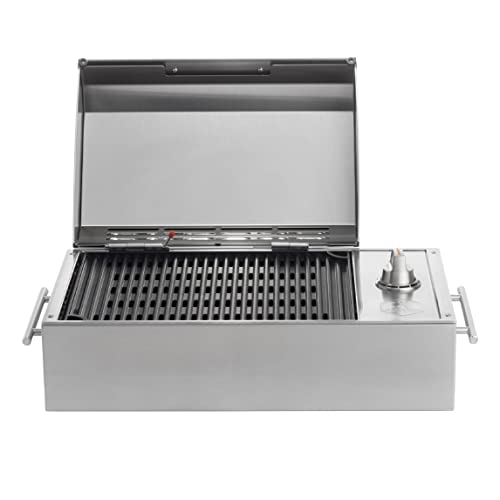
Kenyon City Grill Portable Stainless Steel Electric Grill
Why we picked it: a grill you can actually carry to the campsite, the tailgate or the cabin without borrowing a truck. Stainless, no propane tank to wrestle, and hot enough to cook for four guys rather than reheat for one.
 August's Pick LiberNovo Maxis Electric Big and Tall Ergonomic Office Chair, Graphite 52cm $1,466.00
  July's Pick Powerful Propane Torch Gun, Adjustable Flame Thrower Gun, Kitchen Torch with Detachable Design, Flamethrower Blow Torch for BBQ, Searing Steak, Welding, Camping Charcoal Lighter(Tank Not Included) $41.99
  June's Pick OYASUMI Funny BBQ Man Hot Dog Holders, 4 PCS Reusable Stainless Steel Sausage Stands, Portable Hot Dog Roasters, Barbecue Grill Accessories for Camping & Party Gifts $14.98
 Promoted by FlowAds

A WireGuard-based overlay network puts your laptop and your NAS on the same private network no matter which continent you are on, with zero open ports on the router. A vendor relay service does a similar job with less control over the middle, which is a fair trade if you would rather not run anything. A reverse proxy with real authentication in front suits anyone who wants browser access without a client on every device. The principle under all three is identical - you prove who you are before you reach the service, not at the service.
Your Mailbox Is the Master Key to All of It
Here is the deal on why the inbox outranks the firewall. Nobody needs to break a password when they can reset it. Every account standing between a stranger and your hardware - the router's cloud login, the NAS vendor portal, your registrar, your host, your bank - resolves back to one address that is allowed to approve the change.
Which means the account you set up in your bachelor days and have been forwarding everything into ever since, the one with a reused password and a recovery number that stopped being your number two carriers ago, is the real security boundary around your network. Not the VLAN. Not the firewall rules. That mailbox.
Give it the same treatment you gave the network. A unique password, a hardware key, and a provider whose business model is not reading it. Encrypted mail with zero-access encryption means a breach on the provider's side hands somebody ciphertext instead of your entire reset history. Then take the step most people skip and go change the recovery address on your critical accounts so it points at the hardened mailbox instead of the everyday one.
Why Google and Microsoft Changed How You Log In
If a mail app on your phone has suddenly quit and demanded you sign in again, that was not a bug. Google stopped accepting plain username-and-password sign-ins from third-party apps for Gmail, Calendar and Contacts on March 14, 2025, and Workspace accounts lost less-secure-app access entirely on May 1, 2025. Microsoft is walking the same road - Exchange Online began retiring basic authentication for SMTP client submission on March 1, 2026, and it goes off by default for existing tenants at the end of 2026.
The reasoning matters more than the inconvenience. A stored mail password is a permanent credential that travels with you, synced onto the laptop, the phone, the tablet, and the client you forgot about on a machine at home. An OAuth token is scoped to one app, expires on its own, and can be killed from a phone screen in about ten seconds. When you are five time zones from your own hardware, the ability to revoke access remotely is worth more than any password you could have picked.
This is not a Google problem or a Microsoft problem - every serious mail provider is converging on the same answer, which is why "just use IMAP with your password" went from advice to warning inside of two years.
What Local AI Models Changed on Both Sides of This
The old test for spotting a phishing email was bad grammar. That tell is dead. Open-weight models like Llama, Mistral and Qwen run fine on a machine in somebody's spare bedroom, and a model running locally carries none of the moderation a hosted service applies. Whoever writes the "your NAS certificate has expired" email is no longer working in a second language off a template from 2011. It is clean, it references things that are true about you, and it arrives in volume.
The same capability cuts the other direction, and that half is worth a serious look. Those models run on a decent desktop, which puts a category of review work within reach of anyone running their own infrastructure. Point one at a firewall rule set and ask what a given rule permits. Feed it log output and ask what looks out of place. Have it read a config before that config goes anywhere near production. It runs on hardware you already own with nothing leaving the building, which matters a great deal when the thing under review is your own security posture.
It does not replace judgment, and it will confidently tell you something wrong. What it does is narrow the gap between one guy running his own infrastructure and the team of people who would normally be checking that work.
Planning Is The Key To Success - Setup Work That Has to Happen Before You Leave Home
All of this is trivial from your own couch and miserable from a hotel room in another country. Front-load it.
Kill SMS as a second factor. A text to your home number may never land once you swap to a travel eSIM or a local SIM, and SMS is the weakest factor on the list even when it does arrive. A hardware key like a YubiKey plus an authenticator app covers you with no signal at all - the same reason it belongs in your setup for managing email from the road.
Use aliases for everything that is not load-bearing. A forum, a conference badge, a rental portal that insists on an app - none of those need the address that resets your registrar. A masking service that spins up a throwaway per signup keeps the real one out of the breach dumps that feed credential stuffing.
Then build the break-glass path, because this is the step that gets skipped. If your phone dies in Rome, how do you get in? Printed backup codes living in a bag that is not the bag with the phone. A spare hardware key at home with somebody you trust. Work colleagues who need access should hold their own credentials, not borrow yours - a shared login is how a vacation turns into an incident report.
Testing the Whole Thing From Outside Before the Trip Confirms Your Remote IT Plans Actually Work Right
The failure I would bet money on is not a sophisticated attack. It is a setup that only ever worked from inside your own house - everything resolved, everything connected, and you never noticed the tunnel was doing nothing because you tested it standing on the LAN.
So test it the only honest way. Turn WiFi off on your phone, drop to cellular, and reach every single thing you expect to need - the NAS share, the server console, the router admin, the password manager, and the mail account tied to the hardware key you are about to not pack. Do it a week out rather than the night before, because the fix for whatever breaks is usually a router change you can only make from home. The setups that fail on the road are almost never the ones that got outsmarted. They are the ones nobody ever tried from a parking lot.

Promoted by FlowAds
