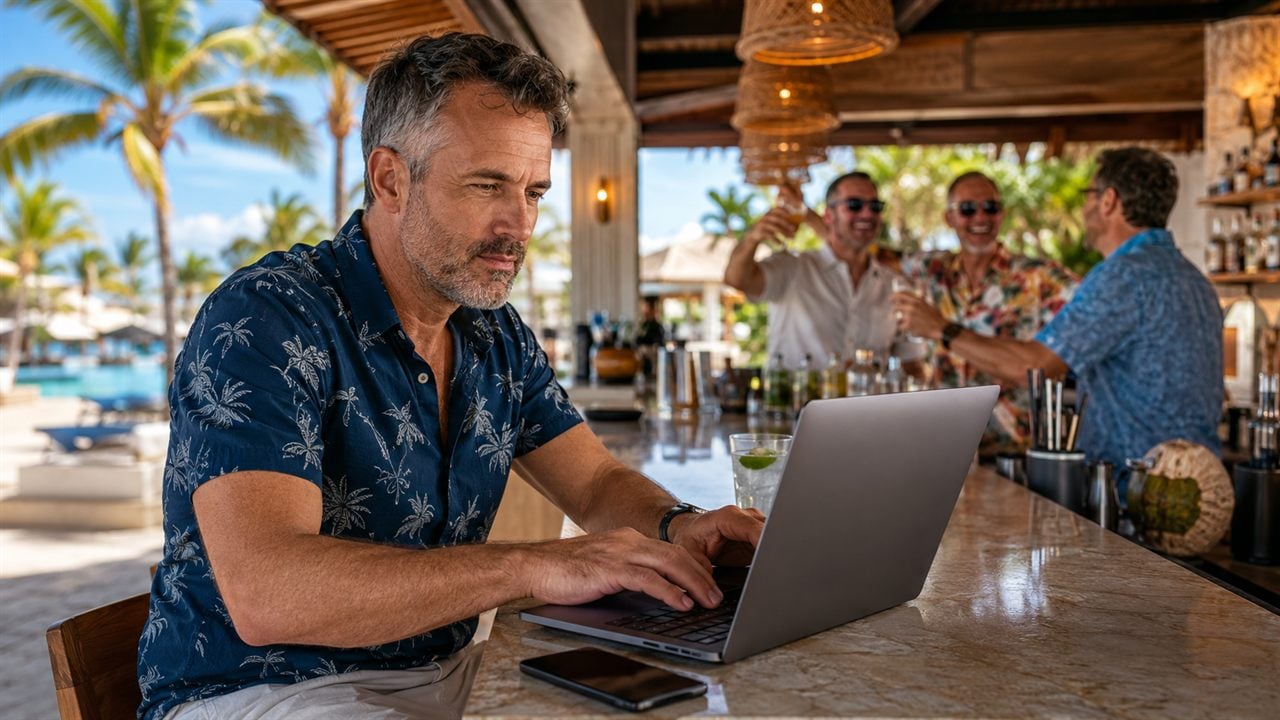
Managing email on the road is less about discipline and more about setup. When you're changing time zones every few days and living on whatever WiFi the airport, the hotel, or the resort bar hands you, a neglected inbox turns into fifty unread messages and no clue which one matters. The trick isn't keeping your inbox perfect while you move - it's setting things up before you leave so email never becomes another problem you're solving from the road.
What Do You Call Your "Guys Trips"?
Staying connected on the road isn't about checking email more - it's about a setup that does most of the work so you don't have to. Here's what that buys you:
- You carry your own data with an eSIM instead of begging for hotel WiFi
- One inbox, built to run from a phone on a flaky signal
- A VPN and app-based 2FA so a login from a new country isn't an open door
- Everything important saved offline before the signal drops at check-in
- A once-a-day rhythm that keeps work from taking over the trip
We've all been the guy at the resort bar with the laptop open - gin and tonic going warm next to the trackpad, two buddies three drinks deep and laughing at the far end of the bar, and there you are clearing your inbox. Here's the part nobody updated, though: the hard part of that scene used to be the connection, and the connection problem is mostly solved. The guys still hunting for a working signal in the hotel lobby are running 2015 rules. In 2026 you can land in Lisbon, Portugal with data before you're off the jet bridge, and the cruise ship that charged $30 a day for WiFi that couldn't load a single email now runs Starlink. So the game flipped: carry your own connection, build an inbox that survives a phone screen, and decide up front how much of the trip you'll hand back to work.
Five Moves That Keep You Connected While Traveling
The connection part is the easy half now. The rest is setup and a little discipline, and most of it happens before you leave home.
Carry Your Own Connection
Stop depending on whatever WiFi the airport, the resort, or the seat-back hands you. Load an eSIM before you fly - Airalo or GigSky take about two minutes and a QR code - and you've got your own data the second you land, no hunting for a hotel password or fighting a captive portal. Switch on Wi-Fi calling and your regular number rings like you never left.

Ways To Learn About Indigenous Cultures And Traditions On An Alaska Cruise
Learn about Alaska Native cultures through village tours, traditional performances, art workshops, authentic cuisine, and local festivals.

Best Walkie-Talkies for Cruises in 2026
The five best Walkie-Talkie for a Cruise Ship allows you to stay connected on a cruise ship and make your trip perfect fun.

Book your next cruise with Heather at Flow Voyages
Flow Voyages is a travel advisor specializing in cruises and resorts.

Highlights Of Sri Lanka - 4 Days
A 4 day highlights tour of Sri Lanka covering ancient kingdoms, Minneriya elephants and tea plucking, ideal for short visits.
Promoted by FlowAds

Cruises are their own animal. The ship's WiFi finally got good - most of the big lines have rolled out Starlink - but it's still billed per device per day, and it drops the moment you sail into a dead zone. So know your alternatives before you board: we put Cellular at Sea Cruise+ up against the ship's WiFi package on a Canada and New England sailing, and for anyone who mainly needs voice and email between ports, the per-day math often beats the WiFi plan.
Pick an Inbox You Can Run From a Phone
However you carry your connection, you're checking mail on a phone screen on a signal that comes and goes - so the inbox has to be built for that. Funnel everything through one address, forward your other accounts into it, and set filters so promos and newsletters skip the main inbox while anything from your bank lands in a folder you only open on a network you trust.
While you're at it, ask whether your provider still fits the way you travel. Google keeps tightening the screws - storage you suddenly pay for, a free tier that shrinks every year, AI features nobody asked for - and plenty of guys who live out of a carry-on have switched to email built around privacy instead of ad targeting. One address means one login to protect and far less junk to wade through when the WiFi is bad.
Man Gear Pick of the Month
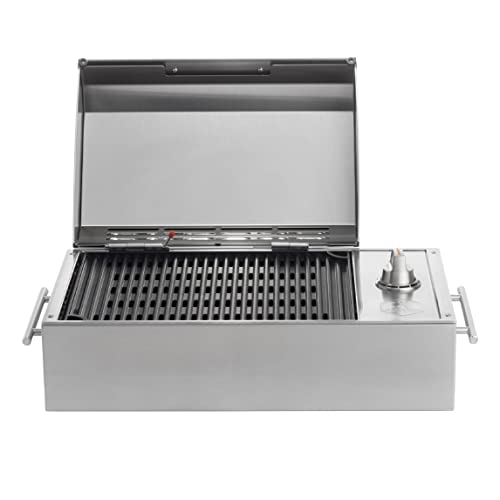
Kenyon City Grill Portable Stainless Steel Electric Grill
Why we picked it: a grill you can actually carry to the campsite, the tailgate or the cabin without borrowing a truck. Stainless, no propane tank to wrestle, and hot enough to cook for four guys rather than reheat for one.
 August's Pick LiberNovo Maxis Electric Big and Tall Ergonomic Office Chair, Graphite 52cm $1,393.00
  July's Pick Powerful Propane Torch Gun, Adjustable Flame Thrower Gun, Kitchen Torch with Detachable Design, Flamethrower Blow Torch for BBQ, Searing Steak, Welding, Camping Charcoal Lighter(Tank Not Included) $42.99
  June's Pick OYASUMI Funny BBQ Man Hot Dog Holders, 4 PCS Reusable Stainless Steel Sausage Stands, Portable Hot Dog Roasters, Barbecue Grill Accessories for Camping & Party Gifts $7.98
 Promoted by FlowAds

Lock It Down for Public Networks
Public WiFi is where most of us get sloppy, and a VPN is the fix - it encrypts your connection so a shared hotel or cafe network can't read what you're sending.
Run one on any network you don't control. Then sort your second factor before you go, because travel breaks the lazy version: if you swap to a local SIM or set a travel eSIM as your only active line, an SMS code to your home number may never arrive. Lean on an authenticator app, which spits out codes with no signal at all, or passkeys, which drop the SMS dependency entirely. Logging in from a new country every few days already trips your provider's fraud flags, and good two-factor is the difference between clearing a "was this you?" prompt in two seconds and spending your first night in Madrid, Spain locked out of your own account. These resources on staying safe while traveling go deeper on the rest.
Build the Mobile Office Before You Need It
Download what you'll need before you need it - boarding passes, confirmations, hotel addresses, the contract you swore you wouldn't open - because even your own connection drops in tunnels, dead zones, and packed terminals. On travel days, an airport lounge buys you power, quiet, and WiFi that holds a video call, which is the difference between landing ready and landing behind. I've written before about why hoping for good WiFi is a losing strategy and what a mobile office needs to survive the road; the short version is redundancy - two ways online, everything important saved offline, and nothing you can't reach at a check-in counter with one bar of signal.
Set the Boundary, Then Be on the Trip
All this setup exists so you can do the opposite of what it enables: not check. The connection being easy is exactly why the boundary is on you now - nobody else is going to enforce it. Pick one window a day, tell your boss, your clients, and the guys you're traveling with when it is, and let an auto-responder hold everything outside it. On a press trip you're already half-working; on a cruise or at an all-inclusive you're not - decide which one this is before you go, and protect it. The always-on pressure is a choice, and killing it is the whole reason you set any of this up.
The Internet Connection's the Easy Part Now
None of this is about working more on vacation - it's about killing the friction that lets work bleed into everything. Carry your own data, run one inbox built for a phone, lock it down, and save what matters offline, and you've handled every excuse to stay glued to the screen. What's left is the only decision that matters: how much of the trip you give back to the inbox, and how much you keep for the reason you left. Set the auto-responder before you head to the airport, not after you land - travel days are when people email you most - then clear your one daily window over coffee, not over a warm gin and tonic three drinks into happy hour.